This post is going to be dedicated to efficiency, a bit in everyday life but mostly for your computer life. Let's start with the computer stuff, so if you're not interested in computers or have no ideas how to use one keep on reading and you'll learn a lot ;)


Digsby:
First of you can probably tell that I have added yet another feature to this blog, the Digsby widget. I was just stopping by download.com to get a video converter so that I can view "The Big Bang Theory on my iPhone". And there was a so called featured download, "exclusively" on download.com for a limited amount of time(figured out that was just bogus as you can download it from Digsbys site). The widget you see in the side is just a mere extra feature to Digsby. Digsby in itself is a program for you computer to let you have all your different chat clients (MSN, Yahoo, Gmail chat, Facebook chat etc) in one program. The reason I downloaded it was to get notifications from Facebook as a pop-up window on my computer so I wouldn't have to check Facebook. This seems thought to not be a feature of Digsby, but I've found it very practical to have facebook chat, MSN and also mails appear as pop-ups. It even tells me when I've got new feeds on Facebook, so if someone updates his or hers status I will be noticed instantly. Maybe not very practical if you try to get some serious work done, but if you're a Facebook junky I guess it would be a good feature. So if you want to check out
Digsby you can visit their site (still just beta versions out(and for those of you who actually kept on reading despite your lack of computer knowledge a beta is an unfinished version of a program, from the Greek letter B)). Oh, and another cool feature is that you can respond directly from the small pop-up, so you wont have to open a normal conversation window, making it easier to resume work again after you've responded.
Definitely a tool of efficiency.
P.S: For those of you who are on the look for a video converter tool I ended up with
WinX Video Converter. It's not perfect but it works, the only major drawback I can see so far is that it gives my files strange names instead of the original filename..
Launchy:
Another nifty application you might like is Launchy. It's a small tool which runs in the background of your computer and opens when you press a specified key-combination (default is Alt+Space, something which I find pleasant as they are right next to each other). When the program launches you are prompted with a text field where you start to type in the name of one of your programs. Then it will search it's list of programs on your computer (the definition of program is up to you to decide, I've included everything with an .exe ending so that I would get programs as regedit and cmd in there). Then you are given a primary suggestion which will launch if you press enter and also a list of other programs.
Again, not a perfect application. My first guess for O would be Opera and not IZArcToGo.. But definitely an awesome app which is worth to check out, launching applications have never been easier. And it's also got some nifty widgets like the calculation widget, type e.g. 73*9 and it will tell you it's 657 ;)
Launchy's websiteObjectDock:
This is a program I've been using for a long time now, and it amazes me how inefficient I must have been before I got it. It's kind of like the dock for Macs, but different :D My dock is currently hiding of screen but as soon as I bring my mouse to the bottom a bar with my favorite programs and folders appears. If you click a program it launches (duh) and if you click and hold a folder a fly-out menu appears which allows me to browse the folder and start programs and media without even having to go to the file organizer. Like this:
And there are also some cool widgets for it like the weather widget, keep your mouse over it and a fly-out with the weather appears:
The small white triangle shown under some applications are the indicator that they run ;) So if you want to check that out go to
Stardock.com. Of course all the icons and other graphics are customizable, in fact I have just changed the theme of my dock to go better with the colour of my taskbar(gray/silver). But definitely a tool to check out to max your efficiency ;)
WordWeb:
This is a program I found when looking for a digitally dictionary for an English exam I had a few years ago. As I've never bothered to learn the alphabet properly (eg. what comes after I) I really didn't want to spend precious time flicking through numerous pages of words I'm not interested in at the moment. Thus I found WordWeb, while it doesn't fulfill my original need as it is "just" a thesaurus it does something a lot better. I'm now able to check synonyms, antonyms, exact meanings of words and all this by a simple Ctrl+Right Click on a word. This is what it looks like, clean and simple:
So if you want to check it out just go to
WordWeb.info, definitely worth the seconds to download compared to the time you can spare. Also runs great from memory sticks so that it can be used for those who're not allowed to bring their own computer for exams.
Babylon:
This is something I found recently, it is shareware (if that have ever stopped you, fellow felon) but it is worth checking out. It is in many ways similar to WordWeb however it as able to translate between different languages, so if I now press Shift+Right click on a word it will come up with definition and translations to you defined languages. As it is shareware I will not talk to much about it, but again, worth to check out:
Babylon 8Dictionary:
Just for those of you looking for a free dictionary, capable of running of a memory stick you should check out
FREELANG Dictionary. You might have to be a bit techy to get it working but it works really nice. But back to my actual topic, efficiency.
Research tool:
Got a long paper to write and a lot of quotes and bits of information from a ton of various sources? Not to worry! I've got your back. This is a very helpful tool if you use it right. Just select some notes from a webpage, and press Ctrl+f12 (by default) and the text you selected will automatically be added to your list of notes along with the time you got it and also the page you got it from. You can of course also write in notes from a lexicon by hand and add it's source. And all the notes are sorted in a list something like this:
So now you can read an article and mark things interesting to your research, press the combination and read on. No more hassle. And when you're done you can open up your favorite text processor(e.g. Word) and simply start compiling that paper you had to write, all sources included! No more looking through your browser history to find that one missing page which you remember so well the contents of but can't seem to find. What's it's name you say?
CintaNotes.com. Compatible with memory sticks, so there's no reason not to get it :D
F.lux:
This is one of the best programs I've seen in a while, simple yet extremely effective. Working night shifts on your computer? Going to bed soon but you'll have to write that school task for tomorrow? F.lux is your program. It's super easy, just install, set your location and Voila! Your screen now dims down to a pleasant to the eye orange when it starts getting dark and goes over to a shiny blue when your on in the morning. Not only does it spare your eyes from excessive strain but the light also seems to have a good effect on your sleep as you wont feel like you've been staring at the sun when it's finally time to go to bed. So sorry, but screenshots does not show the F.lux effect so I can't show you what it looks like, but trust me, when you've first tried it it's the first thing you want to install on your new computers.
F.lux: Software which makes your life betterOpera:
Of course I have to mention it here, my favorite browser. Might not be the fastest out there (however considerably faster than Internet Explorer) but it has so far no discovered security holes, totally customizable design, mouse gestures, speed dial etc. As you might have seen I have tweaked my Opera Browser to give me the most logical space possible by putting my tabs over on the right side of my screen instead of on the top giving me more room for actual websides and less space for fill-in graphics, cause lets face it, webpages aren't made for widescreen computers. I have also fixed it so that I've got 15 Speed Dial buttons instead of nine and added a View in IE button allowing me to view those pages which requires you to have IE right in Opera. I've also taken a few seconds to learn the mouse gestures, just click right mouse button and draw a simple one or two stroke pattern and do common commands as forward, backward, new tab, close tab, refresh tab etc.
Anyways, get your
free copy today and start using the best browser out there :D
But now that you've got a lot of nifty new software in your arsenal against inefficiency I have to burst your bubble of joy. You're still not on top just yet. Just take a second and look down, at your keyboard. Did you ever wonder as a kid why the stupid keys couldn't just be placed alphabetically so that you wouldn't have to hunt down every single key. At least I did. Of course that is a long time ago and I've tackled the struggle against the gateway between me and the computer. But I was just halfway there. A regular keyboard, or so called QWERTY (that's right, the top six letters of your keyboard), is now in use over almost the entire world. With a few exceptions like the QWERTZ for Dutch speakers and AZERTY for the French speaking the QWERTY is almost everywhere. And if you look down at yours there is a very high possibility that you use one. But why are the letters arranged like this? At first they were actually arranged alphabetically, but that was way back in the days when they used typewriters. The problem with typewriters though was that they had a tendency to jam. Meaning that the typing heads of the machine got locked up in each other and the writer had to get his/hers hands dirty to get them back(you can still see this if you just spam a typewriter with random letters). So a smart guy figured, what if I move all of the keys which are used a lot and separate them, that way the typing heads got further apart and the likeliness of jamming decreased. But this also means that you'll have to move your fingers a bit extra every time you want to type a common letter. While it seems like a bagatelle to most people it's actually got a lot to say when you type a lot. Your fingers gets tired, you type slower and you can even get strains from typing to much. So what are you going to do? Do what I did, change your keyboard! It is fairly easy, first you get the right keyboard layout installed on your computer, then you pop of all the keys and put them back where they should be. When you're done the keyboard should look something like this:
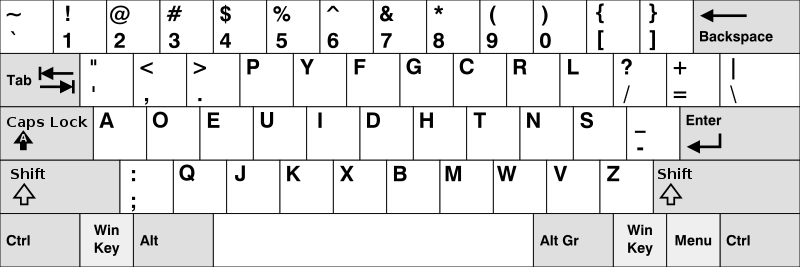
It takes some getting used to but it is definitely worth it, I have now written this whole blog post and I haven't felt the tiniest amount of fatigue to my fingers. So if you want to start of right now I have some useful links:
A funny video on this topic w/instructions (Recomended)Norwegian Dvorak site w/instructionsAnyhow now that you are a super efficient beast on the computer it's time to take a walk (you should probably get one anyways after reading all this text), but what is that you say, your shoelaces takes too long to tie? No problem, just use the
Ian Knot, the worlds fastest shoelace knot! Now it only takes seconds to get you out of the house :D But now that you wake up later as shoe knotting is no longer a problem you sometimes find yourself in a lack of time. And if you're going to a fancy meeting you must make sure that your tie is, well, tied. So let's also learn the
worlds fastest tie knot while we're at it.
Now you're ready to go and take the world by storm with your newly achieved superpowers(not really, but you might get your work done on time). So have fun and be efficient, and if you've got any other ideas on how to be efficient on or of the computer please share your ideas in the comments bellow or give them to me personally in the widget on the side.
And as you've now got a lot of time to spare you can try out this little mind twister:
You shall use the numbers from 1-9, you have to use them all and only once.
Your task is to find two numbers, one with five numbers and the second with the remaining four, which subtracted by each others (big one subtracted by the small one) gives the result 33 333. There are two possible answers. I did this in about 30 minutes during Religion class (damn that's boring). Are you able to do it? To check your answer you can time them together, that should give you either 327 461 580 or 328 347 558 depending on which of the two you found. Tell me if you get it ;) But don't write the numbers, you'll ruin it for everyone else..
And as I've now helped you, help me! Spread the word of efficiency by forwarding this post to your friends and colleagues, simply copy and paste this link: http://arneme.cs.uit.no/8d/Files/bloglinks/link.php?link=http://thepeterverse.blogspot.com/?redir=forward


 Posts
Posts

